Design: the Landscaper as a desktop app
Status: design, not built. Written 2026-11-26 for the maintainer's review before any code, with a prototype run on Linux, Windows and macOS; every question decided the same day.
One signed download per system: Windows, macOS and Linux each get an installer. It starts the engine and shows the editor in a window of its own, with no browser and no terminal window. Builders on their own machine use it; a team server stays a browser page behind a sign-in proxy (TEAM-SERVER.md).
Words used here:
- Shell: the app's own small program. It opens the window and starts the engine.
- Webview: the system's browser engine the window draws the editor with: WebView2 (Microsoft Edge's) on Windows, WKWebView (Safari's) on macOS, WebKitGTK on Linux.
- Sidecar: the engine as a second program the shell starts, the way a double-click starts it today.
- Tauri: the Rust framework the shell is written with (version 2). It opens a webview window and builds each system's installer.
The short version
- The prototype runs on all three systems. The shell written on 2026-10-24 builds against today's engine and editor with no change, and its installers install and start. The editor's 3D view draws on screen in WebKitGTK on Linux and WebView2 on Windows. On macOS it draws in WKWebView's canvas every time, but GitHub's virtual Mac showed it on screen only when the canvas kept its drawing buffer, and then in 3 starts of 5 (Safari there showed no page at all), so a real Mac must confirm macOS ("The prototype"). None of these machines has a GPU: the prototype shows that the view draws, not how fast.
- Every question below is decided at its recommendation (2026-11-26).
- The engine runs inside the app: the shell calls the engine's
serveon a thread, on 127.0.0.1 as today. One program to sign, no second process to leave behind, no terminal window. The prototype's sidecar left its engine running when the shell was killed (question 1). - The editor ships as a folder inside the app, served by the engine as
web/is today (question 2). - Installers: NSIS on Windows (per user, no administrator), a
.dmgwith one universal app on macOS, an AppImage and a.debon Linux (question 4). The prototype built each. - Signing reuses what works: the same Azure Artifact Signing identity through jsign, and the same Developer ID with notarytool. Tauri calls them on every file it packs, and the macOS app can be stapled, so its first start no longer needs Apple's server (question 5).
- Updates: Tauri's updater, which reads a
latest.jsonon the newest GitHub release and asks before installing. It needs one more key, kept as a secret beside the signing ones (question 6). - First start: the app finds the game as the engine does today. When it can't, the window asks for the folder and keeps the
answer in a settings file, because an app started from the Start menu, the Dock or a desktop menu doesn't see
NWN_ROOTset in a shell profile (question 8). - The current download stays as the program for servers and the command line, beside the installers (question 11).
What exists today
The engine is this repository at master adc33fc (version 0.6.1); the editor is
nwn-landscaper-web at main 05b9089.
- The release (
.github/workflows/release.yml): one archive per system with the engine (landscaper,landscaper.exe) and the editor inweb/beside it. A double-click runsquick_start(src/main.rs): it looks for the game, serves on 127.0.0.1:8765 (or the next free port up to 8784), opens the default browser, and keeps a terminal window open until Enter is pressed. The Windows binary is signed with Azure Artifact Signing (jsign, signed in through GitHub's OIDC token), the macOS one is a universal binary signed with a Developer ID and notarized. A bare binary can't be stapled, so macOS asks Apple's server for the ticket at the first start. - The old shell: a Tauri 2 program (
app/, 79 lines of Rust) written on 2026-10-24 and kept out of the first public release. It takes port 8766 (else any free one), startslandscaper serve --port <port> --web <web>as a child, waits up to 30 s for the port to answer, opens a 1440 by 900 window athttp://127.0.0.1:<port>/, and kills the child when the app's event loop ends. It finds the engine andweb/beside itself, or throughLANDSCAPER_ENGINEandLANDSCAPER_WEB. - The editor and the engine are one origin. The editor's
api()(js/api.js) refuses any URL not on the page's own origin, and every API request carries anX-Landscaperheader the engine requires, with aHostcheck against DNS rebinding (src/serve.rs). So the editor must be served by the engine, over HTTP or a stand-in for it. - What the editor keeps in the browser: settings in
localStorage, and copies of areas the engine hasn't taken inIndexedDB(js/copies.js). Both belong to the origin, port included: a different port starts empty. - The data folder (
src/paint.rs,data_dir):landscaperunderXDG_DATA_HOME, else%LOCALAPPDATA%on Windows, else~/.local/share, macOS included. It holds the texture library, workspaces and exports. - Finding the game (
models::game_folders, Moonglow'sGameInstall::detect):--rootorNWN_ROOT, then every Steam library (Steam's folder, the libraries it lists, and on Windows the registry), then GOG's and Beamdog's folders. The user folder comes from--user,NWN_HOMEor the game's own rule; on Windows a double-click also looks in OneDrive'sDocuments. Every other setting is an environment variable (CONFIGURATION.md); there is no settings file.
The prototype
The old shell, copied unchanged into a spike branch of this repository, built against master adc33fc and the editor's main
05b9089. Three additions, for the prototype only: a probe that asks the page after 25 s which WebGL it has and what draws it, a
generated icon set (Windows' resource compiler wants an .ico), and a look for web/ where a bundle puts its resources. A
throwaway workflow on the spike branch built it on GitHub's Windows, macOS and Ubuntu runners, ran it, took a screenshot, then
built each system's installer, installed it and ran the installed copy. It never touched the Release workflow, and no step signed
anything: the signing secrets are kept for version tags.
What it showed
| System | Webview, and what draws | The view, read back | The view on screen | Installer |
|---|---|---|---|---|
| Linux, this machine (Debian 12) | WebKitGTK 2.50.6; llvmpipe, Mesa's software renderer | drawn | drawn, with the game's textures | not built here |
| Linux, Ubuntu 24.04 runner | WebKitGTK; llvmpipe | drawn | drawn (no game, so plain ground) | AppImage, 88 MB: started and drew. .deb, 10 MB: built, not installed |
| Windows Server 2025 runner | WebView2 (Edge 157); WARP, Microsoft's software Direct3D | drawn | drawn | NSIS, 6.3 MB: installed for the user into %LOCALAPPDATA%\NWN Landscaper with no administrator, started and drew. MSI, 8.9 MB: built |
| macOS 26 runner (an Apple silicon virtual machine) | WKWebView; Apple's virtual GPU | drawn, in all 12 starts | empty in all 7 starts as the editor is; shown in 3 of 5 with the drawing buffer kept | .app 26 MB in a .dmg of 9.2 MB (Apple silicon only): started from the bundle, the same as unbundled |
Read back is the probe reading 225 pixels of the editor's canvas right after the editor draws a frame: on every system all 225 differed from the canvas's clear colour, in 80 to 166 colours. The probe also drew a triangle of its own and read it back right on every system, and the page reported no script errors anywhere. WebGL 2 was there on all of them, with 16,384 px textures.
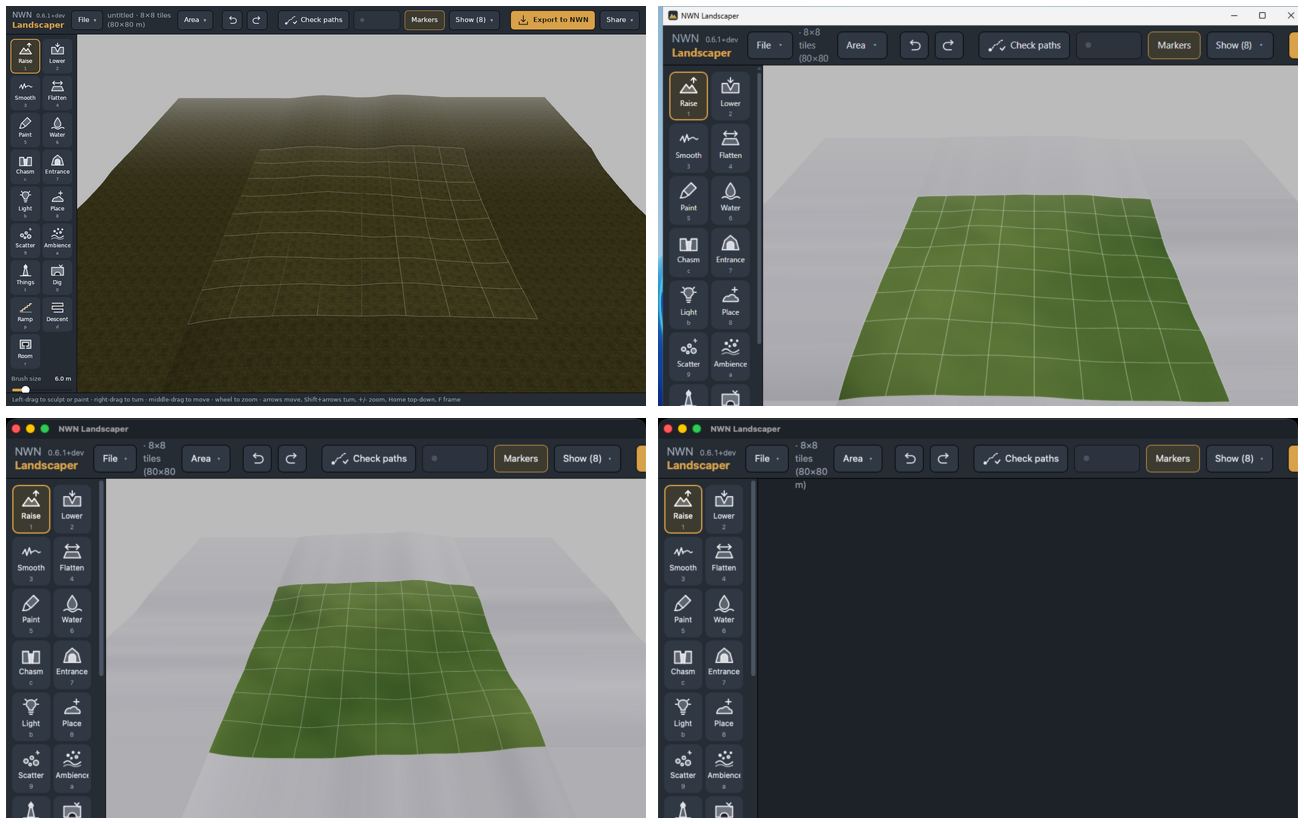
The empty view on macOS. The editor draws every frame (js/view.js), and every macOS start read the drawn frame back from
the canvas. Yet as the editor is, the screenshot showed the 3D area empty in all 7 starts, the installed app's included. With the
canvas's drawing buffer kept (preserveDrawingBuffer, set by the probe before the editor makes its renderer), it showed in 3 starts
of 5. Safari on the same runner, opened at the same engine, showed no page at all, not even the editor's buttons. So the runner's
virtual display loses WebKit's GPU layers, sometimes all of them; three.js pages draw in Safari on real Macs every day with the
buffer not kept, so the app most likely draws there too, but no run here proves it. A real Mac has to settle it ("For the
maintainer", at the end). If a real Mac shows the same empty view, the editor keeps the drawing buffer when it runs in the app on
macOS: one option on its WebGLRenderer, at the cost of a copy of each frame.
Also seen:
- The engine outlives the shell. Killing the shell (
SIGTERMon Linux) leftlandscaper serverunning on port 8766, here and on the Ubuntu runner, where the shell died with its virtual display. The old shell stops the engine only on Tauri'sExitevent, which a kill, a crash or a lost display never sends. - Nothing shows for up to 30 s at the start. The old shell waits for the engine's port before it opens the window. The first start with a game builds the starter texture library first (51 textures).
- The window is 1440 by 900, larger than the runners' 1024 by 768 screens; Windows and macOS shrank it to fit. Step 2 sizes it to the screen.
- Bundling took small changes only: an icon set (Windows' resource compiler wants an
.ico), the engine as Tauri'sexternalBin, the editor asresources, and a look forweb/where each bundle puts its resources. Tauri's command line (2.12.4) built every installer on the first try, in under a minute after the shell's build. Building the engine took 5 to 6 minutes on the runners, the shell 1 to 3. - Linux without a window manager (the runners' and this machine's virtual displays) gets no title bar; a desktop draws its own.
The spike branch spike/desktop-app, with the prototype's shell and its workflow, was deleted once the prototype had run. The
last run, with the screenshots, the probe's answers and the unsigned installers, stays on the Actions page until its files expire
on 2027-02-24: run 45888476374.
Questions to settle
Each question gives the decision first and the options not chosen after it.
Decided (2026-11-26), every question at its recommendation: the engine inside the app (question 1); the editor as a web/
folder in the bundle (question 2); port 8766 of its own (question 3); NSIS, a .dmg, an AppImage and a .deb (question 4);
signing through Tauri with today's identities (question 5); Tauri's updater (question 6); the engine's data folder unchanged
(question 7); detection, then a folder picker and settings.json (question 8); all three webviews, with the Linux switch
(question 9); team servers in the browser (question 10); the archives kept beside the installers (question 11); app/ in this
repository's workspace (question 12). The maintainer tries the prototype's .dmg on a real Mac. The build order below follows
these.
1. How the app runs the engine
Decided: inside the app, on a thread. The engine becomes a library as well as a program: src/lib.rs holds today's
modules, and src/main.rs keeps the command line. The shell calls serve::serve("127.0.0.1", port, web, false) on a thread
before it opens the window, and the window loads http://127.0.0.1:<port>/ as the prototype does. The engine's request handling,
Host check and X-Landscaper header stay as they are.
- One program per system to sign and notarize, and its version can't differ from the engine's.
- When the window closes, or the app is killed or crashes, the engine goes with it. In the prototype, killing the shell (as a
logout, a crash or Task Manager does) left
landscaper serverunning on port 8766. By the old shell's code, the next start then finds 8766 taken and takes another port, where the editor's settings start empty, because the browser storage belongs to the port. - No terminal window. Rust builds console programs on Windows unless told otherwise: the old shell lacks
windows_subsystem = "windows", and the engine is a console program by design, so started from Explorer each gets a console window unless the shell is built as a window program and starts the engine withCREATE_NO_WINDOW. The runner's screenshots can't show this: its own terminal is on the taskbar already. - What the engine prints goes to a log file in the data folder (
landscaper.log, the last two starts kept), which a Help menu item opens.
The cost is the library split, about 3 hours: the modules move under src/lib.rs, main.rs keeps quick_start and the command
line. serve already takes its address, port and editor folder as arguments. The engine's process-wide caches (14 OnceLock and
LazyLock statics) are fine in one process; they hold what they hold today. An engine panic inside a request is caught per request
(guarded), as now. The webview runs in processes of its own on all three systems, so a stuck export doesn't freeze the
window's drawing.
Considered and not chosen:
- A sidecar (the prototype). It works today and keeps the engine's crashes apart from the window. Each of its three faults has
a fix (
CREATE_NO_WINDOW; the engine exits when its standard input closes, which happens when the shell dies for any reason; a/healthzcheck before taking the port), but each is one more thing to get right on three systems. It also means two binaries in each bundle to sign, which Tauri does, and a universallandscaper-universal-apple-darwinbuilt beside the shell on macOS. Worth keeping as the fallback if the library split runs into trouble. - No port at all: the window loads a custom scheme (
landscaper://), and Tauri hands each request to the engine's handler in process. Nothing else on the machine can reach the engine, and no port can be taken. But each webview spells the origin differently (http://landscaper.localhoston Windows,landscaper://localhostelsewhere), the engine's tiny_http request type would need a second adapter, and long requests (an export, a pack download) go through each webview's custom-scheme plumbing, which the prototype didn't test. A later step if port clashes are ever reported. - Electron: the same Chromium on every system, so the 3D view would behave the same everywhere, including Linux. But it ships about 100 MB of browser, the shell would be JavaScript beside a Rust engine, and the engine would still be a sidecar. Tauri's webview is the system's own.
- Installers that only start the engine and open the browser. Smallest change, but it doesn't meet the goal: it still needs a browser.
2. How the editor ships in the app
Decided: a web/ folder inside the bundle, passed to serve as today. On Windows it sits beside the program in the
install folder, in NWN Landscaper.app/Contents/Resources/web on macOS (inside the signature), and in /usr/lib/NWN Landscaper/web
in the .deb and AppImage. The release packs the editor at the same tag, as it packs web/ now. The prototype's bundles found it
in all three places.
Considered and not chosen:
- Built into the engine's binary (
include_diror a build script): a single file, but the engine's build would need the editor's checkout, and the command-line program would grow by about 3.6 MB that a team server doesn't use. - Tauri's own asset protocol for the editor (
frontendDist): the page's origin would then differ from the engine's, andapi()refuses that by design. Every API call would need cross-origin rules on the engine.
3. Which address the window loads
Decided: http://127.0.0.1:8766/, a fixed port of its own. It differs from a double-click's 8765, so the app and a
browser session keep separate storage and can run together. A second start of the app brings its window forward instead of
starting another engine (Tauri's single-instance plugin), so with the engine inside the app nothing of ours holds 8766 when the
app starts. If another program holds it, the app takes the first free port from 8767 to 8785 and says in the log that the editor's
settings start empty there.
Considered and not chosen:
- Any free port each start: the editor's settings and its kept copies would start empty every time.
- 8765, the double-click's port: the app and a double-clicked engine would fight over it, and the second one would end up on a port whose storage is empty.
4. Installers
Decided:
| System | Installer | Notes |
|---|---|---|
| Windows | NSIS .exe, installs per user into %LOCALAPPDATA%\NWN Landscaper, no administrator |
Start menu entry, uninstaller. WebView2 is part of Windows 10 and 11; the installer downloads it when missing |
| macOS | .dmg holding NWN Landscaper.app, universal (Apple silicon and Intel) |
Minimum macOS 11, set in bundle.macOS.minimumSystemVersion |
| Linux | AppImage, and a .deb for Debian 12, Ubuntu 22.04 and newer |
Both built on Debian 12 so they need glibc 2.36, as the archive does now |
The editor's three.js is release 186, which draws with WebGL 2 only (three.js dropped WebGL 1 in release 163). WKWebView has WebGL 2 from Safari 15's WebKit, which macOS 11 and newer get; the minimum of 11 keeps a Mac whose webview can't draw the view from installing the app.
Considered and not chosen:
- MSI on Windows: installs for every user and wants an administrator by default; it suits company rollouts, which this tool doesn't have. Tauri's updater handles NSIS and MSI alike.
- Flatpak on Linux: sandboxed, so the game and user folders need permissions or a portal for every folder the engine reads;
more work for a third package. An RPM (Fedora) can be added beside the
.debin the same Tauri command if asked for.
5. Signing
Decided: Tauri signs, with the identities the release already uses. Signing has to happen while Tauri packs: the installer holds the program, so signing the program after the installer is built leaves an unsigned copy inside it.
- Windows:
bundle.windows.signCommandruns a command for each file Tauri signs: the program, the NSIS installer and its uninstaller. The command is today's jsign line with the Azure token fetched once beforetauri build(an Azure access token lasts about an hour; the build takes minutes). Windows' own check (Get-AuthenticodeSignature) runs on the installer and the installed program, as it does on the binary now. - macOS: the release's signing keychain stays as it is. Tauri signs the app with
APPLE_SIGNING_IDENTITY(the identity the workflow already finds), with the hardened runtime, then notarizes with the App Store Connect key the workflow already has (APPLE_API_KEY,APPLE_API_ISSUER,APPLE_API_KEY_PATH) and staples the ticket to the app; the.dmgis signed the same way. A stapled app starts without asking Apple's server, which the bare binary can't do today. WKWebView's JavaScript compiler runs in Apple's own processes, so the app needs no JIT entitlement. - Linux: unsigned, as now;
SHA256SUMScovers the AppImage and the.deb, and the updater's signature covers updates.
No new certificate or account is needed. Each release signs about four more files on Windows, well inside Azure Artifact Signing's monthly quota.
Considered and not chosen: our own sign steps after Tauri. It would mean unpacking and repacking each installer.
6. Updates
Decided: Tauri's updater, asking first. At start the app reads
https://github.com/plenarius/nwn-landscaper/releases/latest/download/latest.json. When it names a newer version, the editor's
version menu shows "Update to 0.7.0" with the release notes; the app downloads the installer, checks it against the updater's
public key built into the app, installs and restarts. Windows reinstalls through the NSIS installer, macOS replaces the app from
a .app.tar.gz, and Linux replaces the AppImage; a .deb is updated by downloading the new one. GitHub's latest URL only
points at a published release, so the draft-then-publish flow stays: nothing updates until the release is published by hand.
The updater signs with its own key pair (minisign), apart from the code signing: the private key and its password go in the
release environment as two more secrets, and the public key goes in tauri.conf.json. If the private key is lost, installed
apps can't update any more; each user then installs the next version by hand once, from an app with the new public key. So the
key needs a backup outside GitHub.
Considered and not chosen:
- A notice only: the app reads GitHub's latest release and shows "0.7.0 is out" with a link. No key to keep, but every update is a download, an install and a restart by hand, on three systems.
- No update check, as today.
7. Where the app keeps its data
Decided: the engine's data folder, unchanged on every system, so the app, a double-clicked program and the command line
share areas, workspaces and the texture library: %LOCALAPPDATA%\landscaper on Windows, ~/.local/share/landscaper on Linux and
macOS. The webview keeps its own storage where Tauri puts it, under the app's identifier (io.github.plenarius.nwnlandscaper):
%LOCALAPPDATA%\io.github.plenarius.nwnlandscaper on Windows, ~/Library/WebKit/io.github.plenarius.nwnlandscaper on macOS and
~/.local/share/io.github.plenarius.nwnlandscaper on Linux. The identifier must not change after the first release: a new one
starts the webview's storage empty. A Help menu item opens the data folder; another opens the log.
Considered and not chosen: ~/Library/Application Support/landscaper on macOS, where Mac apps usually keep data. It means
moving the folder of every Mac user of the archive, and the command line would have to follow; a later change if asked for.
8. Finding the game
Decided: detect as today, then ask in the window, and keep the answer in a settings file. The engine's detection already
covers Steam, GOG and Beamdog on all three systems. When it finds nothing, the app shows its own page before the editor: "The
Landscaper needs Neverwinter Nights: Enhanced Edition. Choose its folder (the one with data/nwn_base.key)", with a folder
picker, and the same for the user folder when the game has never been started. The answer goes to settings.json in the data
folder. The engine reads that file below the environment and the command line, for the game folders and for any setting in
CONFIGURATION.md (LANDSCAPER_HAKS, LANDSCAPER_TLK, ...), so a double-click and the command line can use it
too. An Area settings item ("Game folders...") reopens the page.
This is needed for the app in particular: a program started from the Dock or Finder doesn't read ~/.zshrc, so the quick start's
advice to set NWN_ROOT there doesn't reach it. A program started from a Linux desktop menu reads ~/.profile only on some
desktops. On Windows, setx does reach it.
macOS asks once for the Documents folder. The user folder is ~/Documents/Neverwinter Nights, and macOS asks the user before an
app reads Documents ("NWN Landscaper would like to access files in your Documents folder"). The app's first page says this is
coming. The archive's terminal program gets the same prompt for the terminal app today.
9. The 3D view in each webview
Decided: ship on all three webviews once a real Mac shows the view, with a fallback for Linux. The prototype drew the view in all three webviews' canvases, and on screen on Linux and Windows (above). What it can't show is speed, a desktop with a GPU, or a real Mac's screen:
- Windows (WebView2): the same Chromium as Edge, with Edge's GPU list and fallbacks; the view behaves as in a browser on the same machine.
- macOS (WKWebView): Safari's WebKit, WebGL through Metal. The view should behave as in Safari; GitHub's virtual Mac lost it on screen in most starts, Safari's page included, which a real Mac has to rule out ("For the maintainer").
- Linux (WebKitGTK): the weakest of the three. Known trouble: a blank or flickering window with NVIDIA's own driver under
Wayland, from WebKitGTK's DMA-BUF renderer; the usual cure is
WEBKIT_DISABLE_DMABUF_RENDERER=1. The app sets it when it finds the NVIDIA driver loaded (/proc/driver/nvidia/version), and aLANDSCAPER_WEBVIEW_SAFE=1switch sets it, withWEBKIT_DISABLE_COMPOSITING_MODE=1, for anyone else. The archive and a browser stay as the way out for a Linux desktop whose WebKitGTK can't draw the view.
The editor needs no change for any of the three: the prototype ran the editor's main as it is.
10. Team servers
Decided: unchanged, in the browser. A team server (serve --team, TEAM-SERVER.md) sits behind a
sign-in proxy that many people reach with their own browsers; its users don't install anything. The app only ever serves itself on
127.0.0.1, refuses --team, and never loads another site in its window: a link to anything else (the release notes, the handbook,
a pull request) opens in the default browser.
11. The current download
Decided: keep it, renamed for what it is. The archives stay in each release as "the program alone: for the command line, for running it on a server, or with your own browser". The release notes put the installers first. The double-click behaviour stays as it is. Nothing removes it: the command line is how imports, exports and checks are scripted, and Linux users whose WebKitGTK can't draw the view need it.
Considered and not chosen: dropping the archives once the app has shipped for a few releases. The command line would then have
to come out of the app bundle, which is awkward on macOS (Contents/MacOS).
12. Where the app's code lives
Decided: app/ in this repository, a member of its Cargo workspace. One Cargo.lock, so cargo-deny, cargo-about and the
release's source archive (which must hold every dependency, as the GPL asks) cover Tauri's crates with no second pass. The root
package stays the default member, so cargo build and the test workflow still build only the engine; a job of the test workflow
builds app/ with Linux's WebKitGTK packages installed. The app's version is the engine's (Tauri reads it from Cargo.toml when
tauri.conf.json names none).
Risks
- WebKitGTK on Linux varies by distribution and driver more than the other two webviews. The prototype saw only software rendering. Question 9's switch and the archive are the fallbacks.
- WebView2 missing: Windows 10 LTSC and some managed machines lack it, and the NSIS installer then downloads it, so a machine offline at install time fails. Tauri can bundle WebView2's offline installer (about 127 MB more) instead, if this is ever reported.
- Port 8766 taken by another program: the app falls back to another port, and the editor's settings start empty there (question 3).
- The updater key (question 6): lost, and every installed app stops updating.
- SmartScreen reputation builds per signing certificate, not per file, so a new installer signed with the same identity starts with the program's standing. A change of certificate would reset it.
- Two downloads on the release page could confuse; the notes name the installer as the one to take.
Build order
Each step is one pull request, shippable alone. Agent time is wall-clock for a coding agent; the maintainer's time is review and trying it.
| # | Step | Repository | Agent | Maintainer |
|---|---|---|---|---|
| 0 | Prototype: the old shell against master and main on Linux, and on Windows and macOS through a throwaway workflow; screenshots; bundles. Done (above) |
engine (spike branch) | 3 h (took 3) | 15 min |
| 1 | The engine as a library: src/lib.rs, main.rs the command line; settings.json read below the environment (question 8) |
engine | 4 h | 30 min |
| 2 | app/: the shell with the engine inside, port 8766 and its checks, single instance, the first-start page and folder picker, the log, links to the default browser, downloads to the Downloads folder, the Linux webview switch |
engine | 8 h | 1 h: try it on each system |
| 3 | The editor in the app: no "How to start the engine" link, a Help menu (data folder, log), the update item; on macOS the kept drawing buffer, if a real Mac needs it | web | 3 h | 20 min |
| 4 | Release: the three bundles in release.yml, signed by Tauri with today's identities, the smoke test installing and starting each bundle, the source archive and licences covering app/; one test tag |
engine | 8 h | 1 h |
| 5 | Updates: the updater key (the hub creates it with the maintainer, keeps it in the password manager and adds the two secrets), latest.json, the update item |
engine + web | 4 h | 30 min |
| 6 | Docs: the handbook's install page, README, QUICKSTART, the release notes' "Getting started", CHANGELOG | both | 2 h | 20 min |
About 29 hours of agent time after the prototype, and 4 hours of the maintainer's. Steps 1 and 3 can start at once; step 2 needs 1, step 4 needs 2, step 5 needs 4.
What this design could not check
- Speed on a GPU. No machine here has one, nor do GitHub's runners: every screenshot is software rendering (llvmpipe on Linux, WARP on Windows) or a virtual machine's GPU (macOS). The prototype shows that the view draws, not how fast.
- macOS on a real Mac ("For the maintainer", below): whether the view shows on screen, as it draws in the canvas.
- NVIDIA under Wayland, where WebKitGTK's known blank window shows; and Intel Macs.
- Signed bundles. The prototype's bundles are unsigned: the signing secrets are for version tags only. Step 4's test tag is the first signed build.
- The updater, which needs a published release and the key.
- Downloads and new windows in each webview: the editor's Publish package (an
<a download>of a blob) and itstarget=_blanklinks. Tauri hands both to the shell, which must save or open them itself (step 2); the prototype didn't exercise them. - Closing the window on a desktop: the prototype's runners have no window manager on Linux, so only killing was tried there.
For the maintainer
- Try the prototype on a real Mac with Apple silicon (10 minutes; the maintainer does this). Download
installers-macos-latestfrom the prototype's run, open the.dmgand drag the app to Applications. It is unsigned, so clear the download mark first: in Terminal,xattr -dr com.apple.quarantine "/Applications/NWN Landscaper.app". Without the game it shows plain green ground; with it, textured ground. If the 3D area stays empty, step 3 keeps the drawing buffer on macOS ("The empty view on macOS"), and that needs a second try on the Mac.installers-windows-latestandinstallers-ubuntu-24.04are there too, for a machine with a GPU. - At step 5: the updater key. The hub creates it with the maintainer, keeps the private key and its password in the password
manager, and adds both to the
releaseenvironment's secrets.